Trelzuno
Pulse Set
Pulse Set
Couldn't load pickup availability
1. Problem Statement
After studying tables, fields, records, and relationships, learners often face a new question: how to receive the needed data from a structure that already exists. Tables may be arranged well, but without query skills, they remain a static set of information. A learner may understand where data is stored but may not know how to select records by condition, sort a list, or combine several criteria. Difficulties also appear when a query result needs to be read, explained, and checked. That is why this stage focuses on seeing a query as a tool for dialogue with a database.
2. Solution
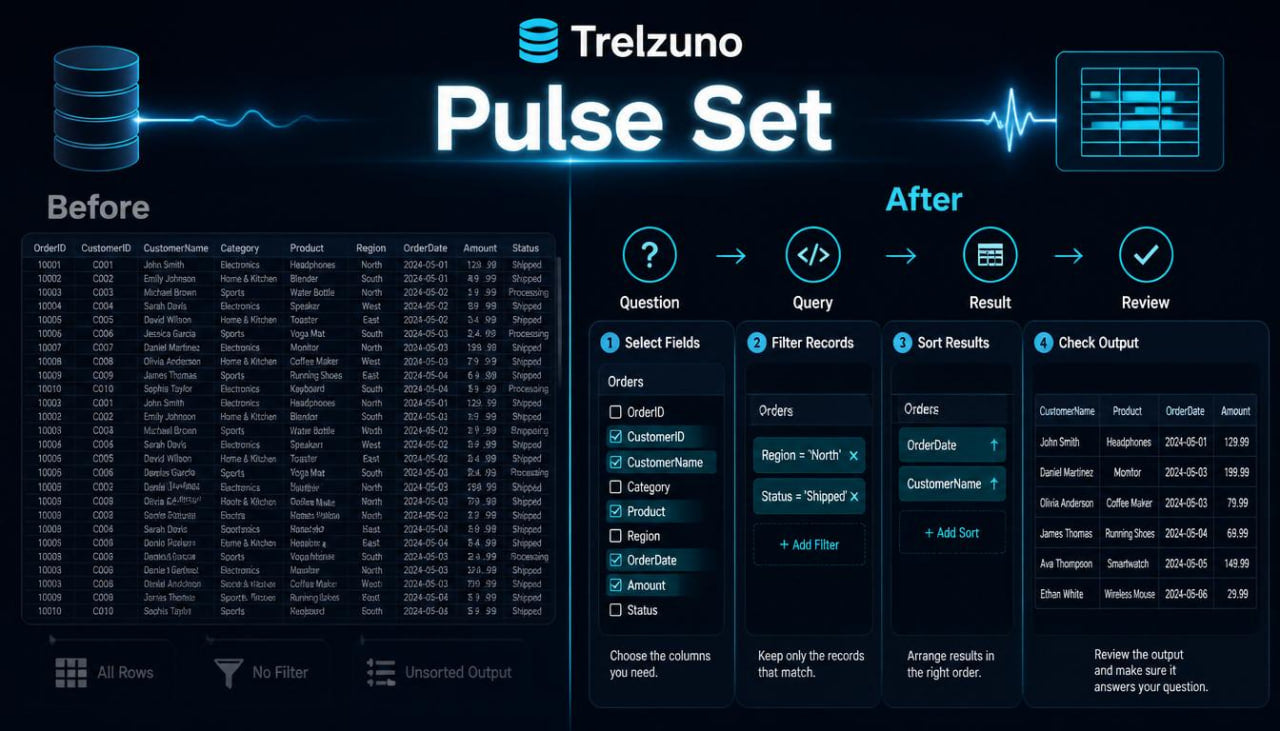
Pulse Set is built around the practice of reading and creating basic queries. The plan explains how to form a query, choose needed fields, set conditions, and analyze the result. The materials move from simple selections to combining several criteria so learners can gradually understand the logic of working with data. Each block includes a short explanation, a learning example, a result review, and a task for independent work. This approach helps learners understand not only the syntax but also why a query returns a specific set of records.
3. What’s Inside
Pulse Set begins with a block about the role of a query in a database. Learners review a query as a way to ask the database a specific question: show all records, select several columns, find rows by condition, sort data, or prepare information for later analysis. The material explains that a query does not change the structure by itself; it helps read data in the needed form.
The second block focuses on selecting fields. Learners study why it is sometimes better not to show every column in a table, but to choose only the ones that matter for a specific task. For example, a course table may show only the title, difficulty level, and creation date while leaving service fields out of the result. Through these examples, learners see how to make the result tidier and easier to read.
The third block explains selecting all records and reading a full table. It uses learning tables with courses, learners, sections, requests, and materials. Learners see what a full selection looks like, how to check the number of rows, how to understand column names, and how to notice data that needs further filtering.
The fourth block focuses on conditions. The materials explain how to select records by a specific value, number range, date, text fragment, or logical marker. For example, a learner may select courses from a certain category, records after a certain date, or materials with a certain status. The difference between an exact match and a partial search is also explained.
The fifth block covers several conditions in one query. Learners study how criteria work together when records need to match several requirements at once, or one of several options. Examples show how the result changes depending on the logic used to combine conditions. This helps learners read the task wording more carefully before writing a query.
The sixth block explains sorting. Learners review how to arrange records by date, title, number value, or status. The materials show the difference between ascending and descending order and explain how several sorting levels can affect the result view. For example, a course list can be sorted first by category and then by creation date.
The seventh block focuses on limiting the number of results. Learners study why it can be useful to review only part of the records, especially when a table has many rows. Learning examples show how to take the first records of a list, check a small table fragment, and work with a result without overload.
The eighth block explains simple calculations in results. Learners are introduced to counting records, finding a minimum or maximum value, grouping by category, and basic summary values. For example, it is possible to count the number of courses in each category or the number of materials in a learning section. Everything is presented through simple examples without heavy constructions.
The ninth block is about reading query errors. Learners see examples with an incorrect field name, a missing condition, mixed data types, or an incorrect action order. The materials explain how to check a query calmly: first table names, then fields, then conditions, then result order.
The tenth block contains a practical collection. Learners work with a Trelzuno learning database: a course table, learner table, section table, and material table. Tasks include selecting needed columns, searching records by category, sorting by date, filtering by status, combining conditions, and counting records.
The eleventh block is a learning scenario called “from question to query.” Learners receive a regular written question, such as: “Show courses from a certain topic, created after a defined date, ordered from newer to older.” Then the material shows how to divide this question into parts: table, fields, conditions, sorting, and result.
The twelfth block contains the plan summary map. It brings together the key topics: field selection, full selection, conditions, several criteria, sorting, result limits, counting, and error checks. This map helps learners review the material before moving to plans with deeper work on relationships and more complex schemas.
4. Who Is This For?
Pulse Set is suitable for learners who already know tables, fields, records, and basic relationships. It is useful for those who want to move from understanding structure to active work with data through queries.
This plan also suits learners who often see query examples but do not always understand why the result looks a certain way. The materials help learners read a task, identify conditions, choose needed fields, and check the result. Pulse Set fits well before plans that include more work with several tables, grouping, and project schemas.
5. What You’ll Learn
- How to understand the role of a query in database work.
- How to choose needed fields from a table.
- How to read a full selection of records.
- How to filter data by text value.
- How to work with number conditions.
- How to use dates in learning queries.
- How to combine several conditions in one query.
- How to distinguish “and” logic from “or” logic in conditions.
- How to sort records by one or several fields.
- How to limit the number of results for review.
- How to count records by simple criteria.
- How to group data in basic learning examples.
- How to find common mistakes in queries.
- How to turn a regular question into a query structure.
- How to check whether the result matches the task.
6. 30-Day Return Terms
For Pulse Set, there is a 30-day period for submitting a payment return request according to the Trelzuno store policy. Details about timing, review conditions, and request steps are described in the store policy so learners can read them before placing an order.
Self-paced learning overview
- 🗂️ Digital file available after purchase
- 🕒 Long-term availability
- 🔐 Secure checkout
- 🗓️ Content updated in 2026
Are Trelzuno courses suitable for beginners?
Are Trelzuno courses suitable for beginners?
Yes, the materials are arranged so learners can move from basic ideas to more advanced topics gradually. Each plan has its own depth, so learners can choose a format that matches their current level.
How are the learning materials presented?
How are the learning materials presented?
The materials are presented through modules, explanations, examples, tasks, diagrams, and practical learning blocks. Everything is arranged so learners can work through the topics at a steady pace.
How do the plans differ from each other?
How do the plans differ from each other?
Each next plan includes a wider set of topics, more practical examples, and deeper explanations of database work. The first plans are suitable for orientation, while later ones explore structure, logic, queries, and project-based thinking in more detail.
Share