Trelzuno
Frame Library
Frame Library
Couldn't load pickup availability
1. Problem Statement
After the first queries and basic relationships, learners often notice that separate examples are already understandable, while a full schema may still look complex. The question becomes how to keep order across many tables, fields, names, data types, and dependencies between records. Without a reference structure, a learner may become confused about where certain information is stored and why it belongs there. Difficulty also appears when reading a schema created by someone else, where the learner needs to understand the author’s logic, table purpose, and the role of each field. That is why this stage focuses on working with a database not only through queries, but also through a description of its inner structure.
2. Solution
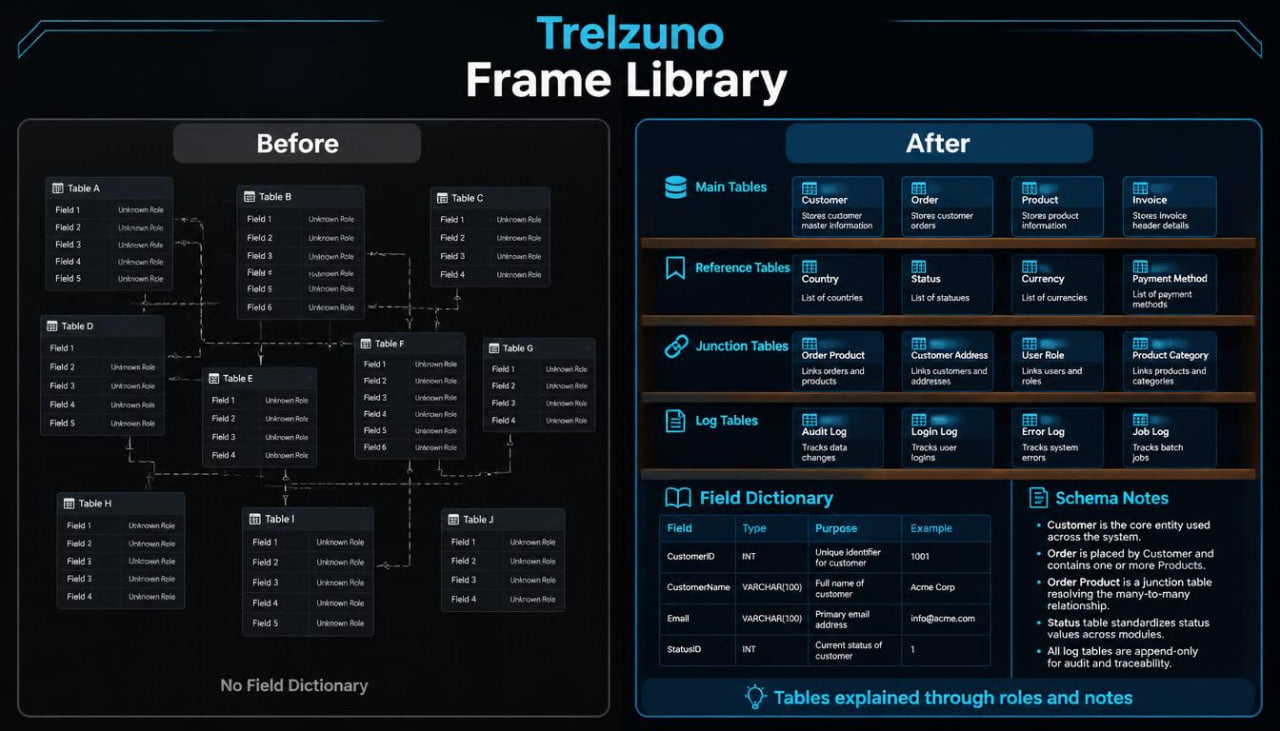
Frame Library presents a database as a set of thoughtful frames, where each table has a role and each field has a defined purpose. The plan helps learners create table descriptions, build field dictionaries, group structures by topic, and check relationship logic. The materials show how to turn separate tables into a learning library of schemas that can be read, explained, and expanded. The center of the plan is not only building structure, but also documenting it in plain language. This approach helps learners prepare for later plans with multi-table queries, deeper models, and project scenarios.
3. What’s Inside
Frame Library begins with a block about the role of a schema in a database. The learner studies that a schema is not just a list of tables, but a map of how information is divided, connected, and prepared for work. The material explains why, before creating queries, it is useful to know which tables exist, which fields they contain, and how records move from one part of the structure to another.
The second block focuses on reading tables by purpose. Learners review different table types: main, reference, junction, log, and descriptive tables. For example, a course table may be a main table, a category table may be a reference table, a course registration table may be a junction table, and a status-change table may be a log table. Through these examples, learners see that tables do not all serve the same role.
The third block explains how to create a field dictionary. Learners study how to describe a field name, data type, purpose, example value, and possible restrictions. For example, the field course_title may store a course title, created_date may store the date a record was added, and status_code may store a short state marker. The material shows how such a dictionary helps avoid confusion between similar fields in different tables.
The fourth block focuses on naming rules. Learners review why table and field names should be consistent, short, and understandable. The materials compare unclear names with tidier options. A separate part explains why mixing naming styles can make schema reading and later query work harder.
The fifth block explores reference tables. Learners study how separate lists of categories, statuses, material types, or difficulty levels can be kept in their own tables. Learning examples show how a reference table reduces repeated values and makes the structure neater. Learners also see how a main table refers to a reference table through an identifier.
The sixth block focuses on junction tables. It explains how to describe relationships where one record can connect with many records from another table. For example, one learner can study several courses, and one course can have several learners. The material shows how a junction table helps describe this relationship without mixing extra data.
The seventh block explains log tables. Learners meet the idea of storing events, changes, and states across time. For example, there may be a table for request status changes, completed sections, or learning material updates. The material helps learners understand why it can be useful to store not only the current value, but also a history of changes.
The eighth block reviews schema description through text. Learners study how to write a short explanation for each table: what it stores, which tables it connects with, which fields are central, and which queries may work with it. Such a description forms learning documentation that can be reviewed while completing tasks.
The ninth block focuses on structure review. Learners receive a list of questions for analysis: whether each table has a separate role, whether unnecessary duplication is present, whether field names are understandable, whether relationships are described correctly, and whether the schema can be read without extra explanation. This block helps learners look at a database with more attention instead of creating tables by habit.
The tenth block contains a library of learning schemas. The plan includes example structures for a course catalog, learning journal, material list, request system, simple order record, and contact base. Each schema has a short description, a list of tables, a list of key fields, and an explanation of relationships. Learners can compare these examples and see how the same logic appears in different topics.
The eleventh block is practical work with a Trelzuno schema. Learners receive a learning description: courses have sections, sections have materials, learners can register for courses, and registrations have statuses. Then they need to create a set of tables, describe fields, build a dictionary, define relationships, and write a short explanation for each part of the structure.
The twelfth block contains the plan summary frame. It gathers the material into one sequence: table types, field dictionary, naming rules, reference tables, junction tables, log tables, text description, structure review, and practical schema. This helps learners see how separate topics form a complete learning library about databases.
4. Who Is This For?
Frame Library is suitable for learners who already know basic queries and want to understand more clearly how a database is organized internally. The plan is useful for those who want to read schemas, describe tables, work with field dictionaries, and see the role of each structure part.
This plan also suits learners who often lose orientation among many names, fields, and relationships. The materials help arrange thinking so a database is not seen as a set of random elements, but as a thoughtful system. Frame Library fits well before moving to plans with deeper relationships, multi-table queries, and learning projects.
5. What You’ll Learn
- How to read a database schema as a logical map.
- How to distinguish main, reference, junction, log, and descriptive tables.
- How to create a field dictionary for a learning structure.
- How to describe the purpose of each field.
- How to choose consistent names for tables and columns.
- How to notice duplication in structure.
- How reference tables work with statuses, categories, and types.
- How junction tables describe relationships between records.
- How log tables store events and changes.
- How to write a short text explanation for a table.
- How to check whether a structure can be read without extra confusion.
- How to analyze learning schemas for different topics.
- How to create a schema for a course catalog with sections and materials.
- How to prepare structure for deeper queries.
- How to connect tables, fields, and relationships into one learning library.
6. 30-Day Return Terms
For Frame Library, there is a 30-day period for submitting a payment return request according to the Trelzuno store policy. Details about timing, review conditions, and request steps are described in the store policy so learners can read the procedure before placing an order.
Self-paced learning overview
- 🗂️ Digital file available after purchase
- 🕒 Long-term availability
- 🔐 Secure checkout
- 🗓️ Content updated in 2026
Are Trelzuno courses suitable for beginners?
Are Trelzuno courses suitable for beginners?
Yes, the materials are arranged so learners can move from basic ideas to more advanced topics gradually. Each plan has its own depth, so learners can choose a format that matches their current level.
How are the learning materials presented?
How are the learning materials presented?
The materials are presented through modules, explanations, examples, tasks, diagrams, and practical learning blocks. Everything is arranged so learners can work through the topics at a steady pace.
How do the plans differ from each other?
How do the plans differ from each other?
Each next plan includes a wider set of topics, more practical examples, and deeper explanations of database work. The first plans are suitable for orientation, while later ones explore structure, logic, queries, and project-based thinking in more detail.
Share