Trelzuno
Axis Module
Axis Module
Couldn't load pickup availability
1. Problem Statement
After learning basic terms, many learners face a new challenge: they may understand what a table, field, and record are, but they do not always see how these elements should work together. Database structure is often created by intuition, without a prior plan, which can lead to duplicated values, extra fields, and unclear relationships. A learner may create tables but still be unable to explain why a certain structure fits a specific set of data. Difficulties also appear when moving from separate examples to a small complete schema. That is why this plan focuses on the axis around which the entire structure is formed.
2. Solution
Axis Module is created as a learning block about the logic of database structure at an early stage. It helps learners understand how to define main objects, separate information between tables, and describe relationships without unnecessary confusion. The materials include learning scenarios where data first appears in a messy form and then becomes an organized schema step by step. This plan gives attention not only to definitions but also to the reasoning behind decisions: why a certain field may belong in another table, why duplication can complicate work with data, and how to read a structure before writing queries. This approach gives learners a stronger base for later study of models, relationships, and queries.
3. What’s Inside
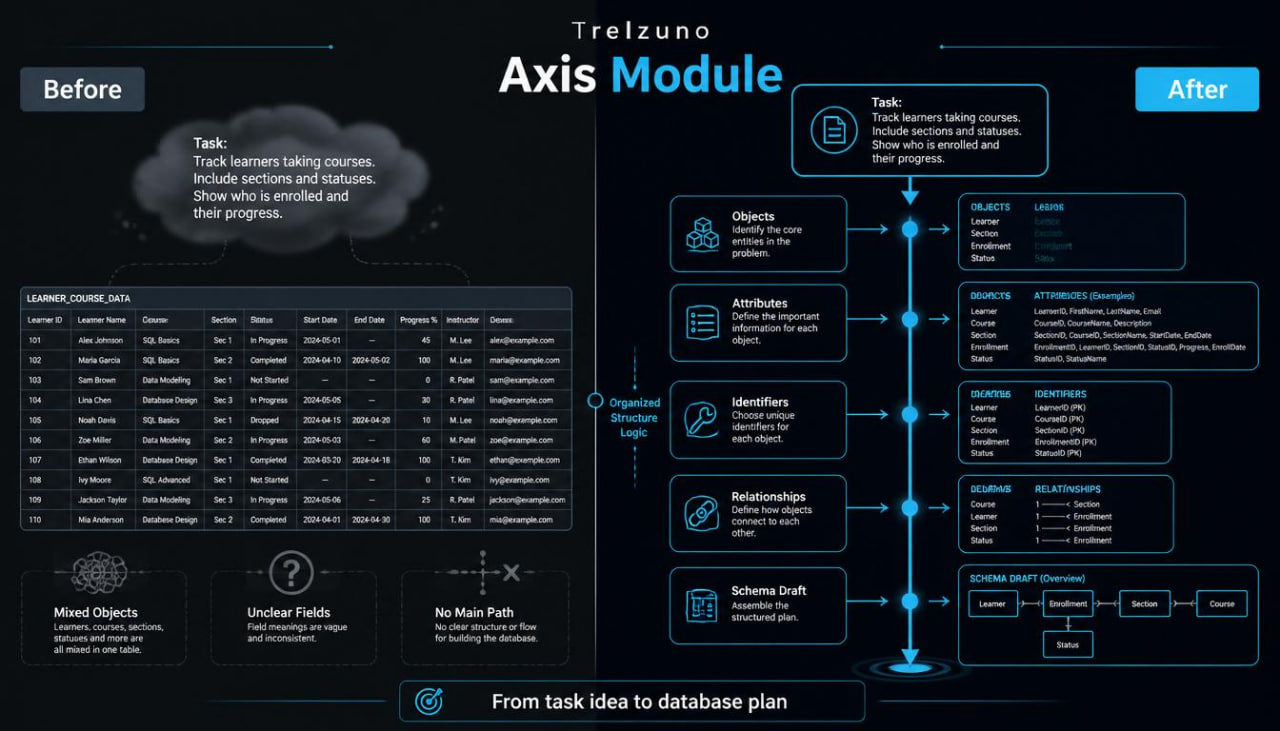
Axis Module begins with a block about the central idea of a database. The learner studies how to define the main theme of a future structure: a learning catalog, order list, material record, student base, class journal, or request table. The material explains why it is useful to understand which objects will be stored, which properties they have, and how they may connect before creating tables.
The second block focuses on objects and entities. Here, learners meet the idea that each table should describe a separate object type. For example, when there are students, courses, and course registrations, placing everything in one table is not always a good choice. The material shows how separating information makes a structure cleaner. Learners see examples where one large table is gradually divided into several connected parts.
The third block explains attributes. Learners study how to choose fields for tables and how to separate needed data from extra details. For example, a student table may include name, email, registration date, and status, while details about a separate course should be kept in another table. Through these examples, the material helps learners avoid mixing different kinds of information in one place.
The fourth block focuses on identifiers. It explains why a unique record number is useful, how it helps separate records from one another, and why names, titles, or dates do not always fit this role. Learners review cases where two records may have the same text values but still need to remain separate database elements.
The fifth block explores relationships between tables. The materials explain the basic difference between one-to-one, one-to-many, and many-to-many relationships through learning examples. For example, one course may have many registrations, one student may connect with several learning topics, and one section may contain several materials. Learners study how these relationships are described at the structure level.
The sixth block is about schemas. It shows how to turn a written task description into a table schema. Learners receive short descriptions and then see how tables, fields, keys, and relationships are identified from them. For example, the description “learners register for courses and complete modules” gradually becomes a structure with several tables.
The seventh block explains common mistakes at an early stage. These include creating one overly large table, duplicating repeated values, using unclear field names, mixing different objects, leaving out identifiers, and placing descriptive data in the wrong place. Each mistake is shown through an example with a short explanation of how it can be corrected in a learning schema.
The eighth block contains practical tasks. Learners receive several small scenarios and identify which tables are needed, which fields should be added, where relationships may appear, and which data should not be duplicated. The tasks are arranged so learners do not only read explanations but also analyze structure on their own.
The ninth block is a mini project for a learning database. Learners create a schema for a small course catalog: a course table, learner table, registration table, section table, and learning material table. The materials show how each table has its own role and how relationships are formed between them.
The tenth block includes a summary map. It gathers the whole plan into one sequence: objects, attributes, identifiers, relationships, schema, and structure review. This map helps learners review the logic of the plan before moving to the next stage.
4. Who Is This For?
Axis Module is suitable for learners who already know basic database ideas and want to understand more deeply how a database structure is created. It is useful for those who know what a table, record, and field are but do not always understand how to divide information between several tables.
This plan is also suitable for learners who want to read a learning task description and turn it into a schema. If a learner often creates tables by intuition, this block helps build a more consistent process. Axis Module is especially suitable before moving to plans that focus more on queries, deeper relationships, and project structure.
5. What You’ll Learn
- How to define the main theme of a database.
- How to identify objects from a written description.
- How to understand the difference between an object and its property.
- How to choose fields for a learning table.
- How to notice data that may belong in a separate table.
- How a unique record identifier works.
- Why duplicated data can complicate structure.
- How to recognize basic relationship types between tables.
- How to read a simple database schema.
- How to turn a task description into a set of tables.
- How to find extra fields in a learning example.
- How to build a schema for a small course catalog.
- How to check whether each table has its own role.
- How to prepare structure for later work with queries.
6. 30-Day Return Terms
For Axis Module, there is a 30-day period for submitting a payment return request according to the Trelzuno store policy. Conditions, timing, and request steps are described in the store policy so learners can review the procedure before placing an order.
Self-paced learning overview
- 🗂️ Digital file available after purchase
- 🕒 Long-term availability
- 🔐 Secure checkout
- 🗓️ Content updated in 2026
Are Trelzuno courses suitable for beginners?
Are Trelzuno courses suitable for beginners?
Yes, the materials are arranged so learners can move from basic ideas to more advanced topics gradually. Each plan has its own depth, so learners can choose a format that matches their current level.
How are the learning materials presented?
How are the learning materials presented?
The materials are presented through modules, explanations, examples, tasks, diagrams, and practical learning blocks. Everything is arranged so learners can work through the topics at a steady pace.
How do the plans differ from each other?
How do the plans differ from each other?
Each next plan includes a wider set of topics, more practical examples, and deeper explanations of database work. The first plans are suitable for orientation, while later ones explore structure, logic, queries, and project-based thinking in more detail.
Share